Open the same live windows and tabs from your phone, tablet, or another computer.
Move one terminal to a different Claude subscription without changing the tabs beside it.
See the active plan, authentication state, usage windows, and reset times at a glance.
Leave the Mac. Keep the terminal.
TerminalDB mirrors the terminal windows already open on your Mac. Sign in once to see every connected Mac, window, and tab, then type into the live session from any modern browser.
Switch Claude subscriptions without restarting your work.
Keep work, team, and personal Claude Code subscriptions signed in side by side. Choose the active profile for one terminal tab in a click. Every other tab keeps its own account, conversation, usage allocation, and billing context.
Add every subscription
Connect the Claude Code accounts you already pay for. Each profile is isolated with its own Keychain credential.
Assign one per tab
Move a busy terminal to a different plan while every neighboring tab continues exactly where it was.
Always know who is active
The status strip keeps the account, plan, authentication state, and usage in view as you work.
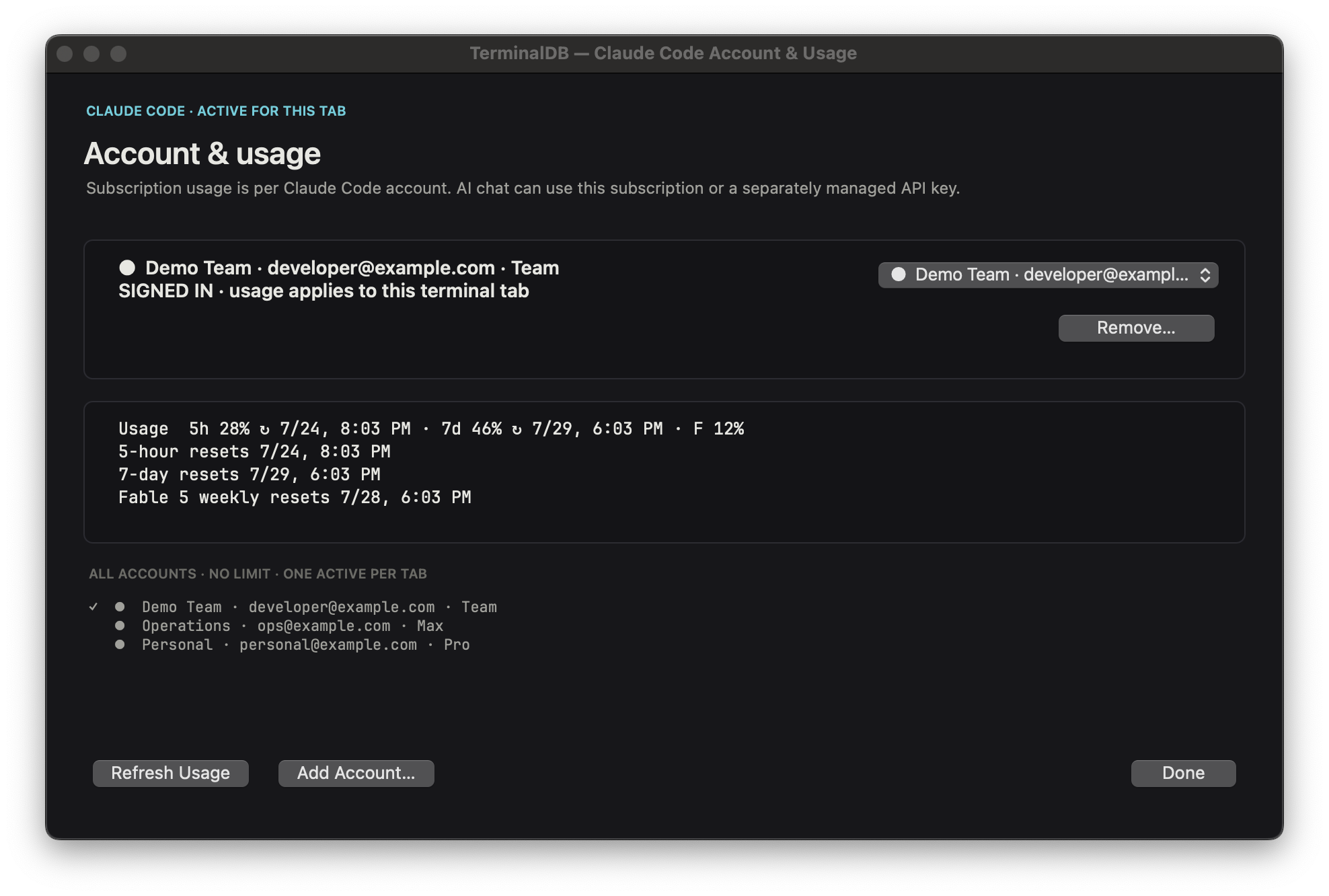
Removing a TerminalDB profile deletes only that local isolated profile and the credential TerminalDB created for it. It does not cancel your Anthropic subscription, and it does not change billing. Sign in again at any time to recreate the profile.
See the limit before it slows you down.
TerminalDB puts Claude Code plan and usage data next to the work using it. Know which subscription is active, how much of each window remains, and exactly when capacity resets.
Every command carries its own context.
Pick a record to inspect. The same fields that make a block readable are the fields that make it searchable, and they are the only thing the assistant is ever handed.
Why structure matters
- Search by outcome. “Show every migration that failed on staging last week.”
- Replay with confidence. Rerun restores the recorded directory and environment, not just the string.
- Explain with evidence. The assistant reads the record (command, output, exit code, working directory) instead of guessing from a fragment.
{
  "command":  "pnpm test --filter api",
  "cwd":      "~/work/api-gateway",
  "host":     "ada-mbp.local",
  "env":      "LOCAL",
  "exit":     0,
  "duration": 8.42,
  "started":  "2026-07-24T14:02:11Z",
  "redacted": true
}
The assistant proposes. You grant.
Every command the AI writes lands in a proposal, never in your shell. Choose the narrowest grant that gets you moving: paste it, run it once, or allow a class of read only commands for this session.
A failure comes with its own evidence.
The assistant receives exactly what you see below, nothing more. The repair it proposes is a proposal, subject to the same permission ladder.
Search what you ran, not what you remember.
Filter by command, path, environment or outcome. Context chips show exactly which records would travel with a question. Secrets are redacted at write time, before they hit disk.
Nothing is written to the database. The window keeps a dim cyan hairline so you always know which mode you're in.
Tokens, keys, connection strings and .env values are masked before storage. Patterns are editable and additive.
Chips are the whole payload. Remove one and it is not sent. There is no hidden background collection.
Built for the whole loop, not just the prompt.
Remote access and account control sit on top of a full native terminal: structured command history, permissioned AI, searchable failures, monitored runs, runbooks, and restorable workspaces.
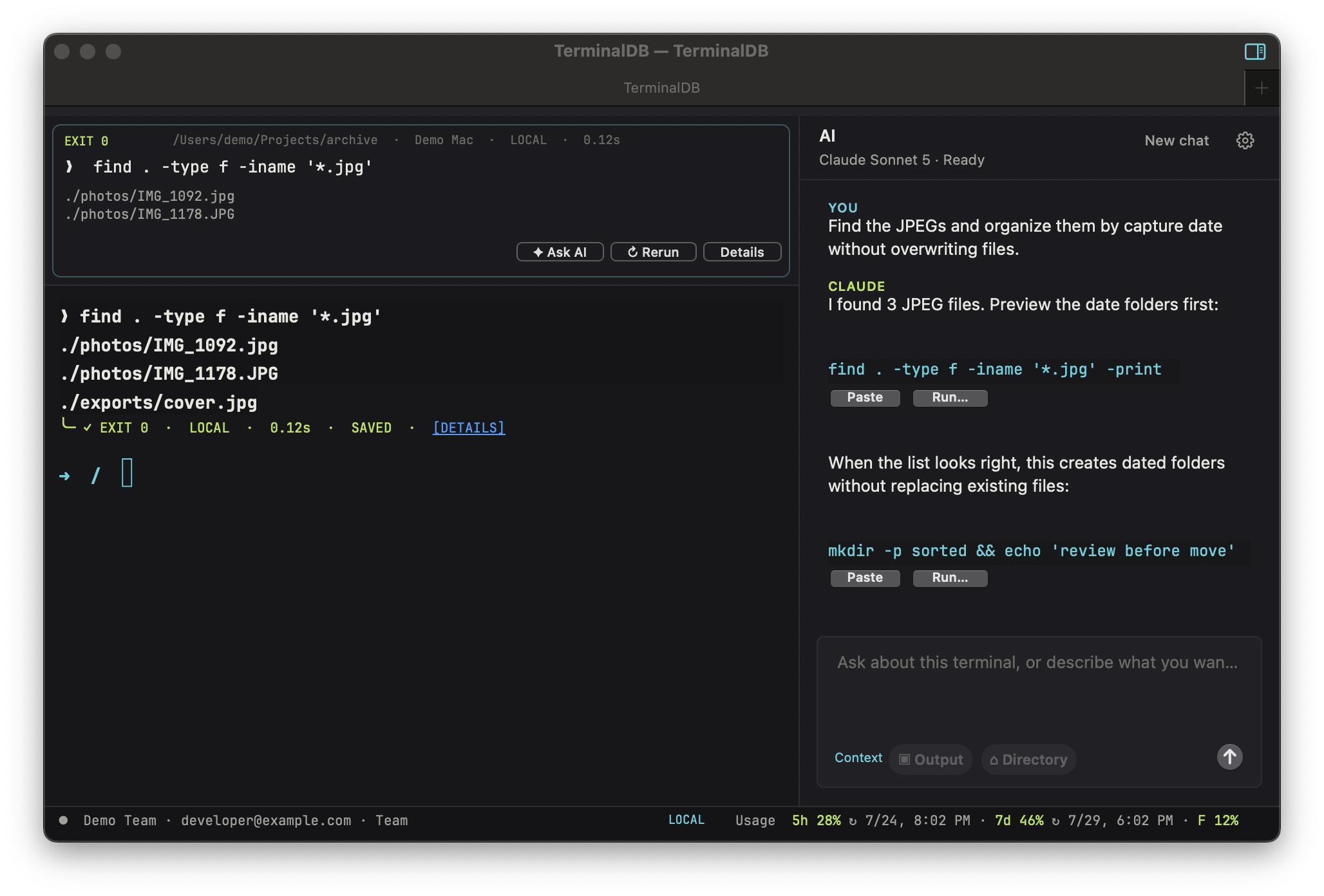
Coding tools with a paper trail
Edits arrive as reviewable diffs. Run the project's tests from the same pane, and revert the whole change set in one action if they fail.
Environment badges
Each tab is labelled from your shell, host and profile. The badge colour follows you into every proposal and confirmation.
Monitored long runs
Builds, syncs and deploys keep a live block with elapsed time and a native notification on exit, even when the window is behind another app.
Runbooks
Promote a sequence of blocks that worked into a named, parameterised runbook. It replays step by step, pausing at any step that writes.
Restorable workspaces
Tabs, directories, environments, scrollback and the AI thread come back exactly as you left them, per project and across restarts.
Native, not a web wrapper
A real macOS app: system menus, Services, search in the style of Spotlight, full keyboard control, and window restoration on relaunch.
Two independent ways to power AI.
Sign in with a Claude subscription, or supply an Anthropic API key. They are separate connections: if both exist you choose which one answers, and subscription account management, terminal sessions and usage tracking carry on either way. See Claude account management for per tab switching.
{{ p.title }}
{{ p.state }}{{ p.body }}
Auditable by design.
One build. Both architectures.
The download always points at the latest asset on GitHub Releases, so it stays valid whatever the final domain turns out to be.
❯ shasum -a 256 TerminalDB-macOS.zip
4f2ab91c7d10e8c5…  TerminalDB-macOS.zip
❯ codesign --verify --deep --strict TerminalDB.app
✓ valid on disk
Every release publishes SHA 256 checksums and a universal bundle. Releases are not yet notarized.
- Permissions inspector lists active session grants
- Redaction patterns are now per project
- Runbooks pause on steps that write
Designed for the days it doesn't work.
The button becomes an inert, clearly labelled notice pointing at the source and the build instructions. It is never a dead link.
Detected version is named, the requirement is stated, and the last compatible release is offered instead of a silent failure.
Retry keeps the same asset URL, with a direct mirror link and the checksum shown so a partial file can be identified.
The page is fully readable without a network. Live release data falls back to the build time snapshot with its date.
The one animation here (the terminal caret) stops under prefers-reduced-motion, along with smooth scrolling. Nothing else moves.
Every control is a real button, link or <details> with a 2px cyan focus ring. All copy is in the HTML, so the site is crawlable and usable with scripting off.
Layouts are fluid rather than locked to breakpoints. Every grid on this page collapses at its own natural minimum, type scales with the viewport, and the app mockups keep their proportions down to 320px. On phones the primary download persists as a bottom bar.
Build it yourself in four commands.
❯ git clone https://github.com/danb235/TerminalDB.git
❯ cd TerminalDB
❯ make bootstrap
❯ make test && make app
Xcode 16 and the pinned toolchain are all you need; make bootstrap fetches the rest and prints what it installed.
GitHub Releases is the canonical source for every application asset and checksum. The stable asset name is TerminalDB-macOS.zip, so the website can always point to the current published tag.
Questions worth answering plainly.
Keep every terminal and Claude account within reach.
Install TerminalDB on your Mac, connect the Claude Code subscriptions you use, and open your live sessions from any browser.